
CMYK vs RGB Difference क्या है? Printing के लिए कौन सा बेहतर है?
1. Introduction
जब हम कोई Design Photoshop, CorelDRAW या किसी दूसरे Graphic Design Software में बनाते हैं, तो Color Mode का सही चुनाव बहुत महत्वपूर्ण होता है। अक्सर Screen पर दिखाई देने वाला Color और Printing के बाद आने वाला Color अलग दिखाई देता है। इसका एक मुख्य कारण RGB और CMYK Color Mode का अंतर है।
अगर आप Printing Business करते हैं, Graphic Designer हैं या Printing के लिए Design तैयार करते हैं, तो आपको यह समझना जरूरी है कि CMYK vs RGB में क्या अंतर है, RGB कहाँ इस्तेमाल होता है और Printing के लिए CMYK क्यों इस्तेमाल किया जाता है।
इस Guide में हम CMYK और RGB को आसान भाषा में समझेंगे और यह भी जानेंगे कि Printing, Digital Media, Photoshop और CorelDRAW में कौन सा Color Mode कब इस्तेमाल करना चाहिए।
2. RGB क्या है?
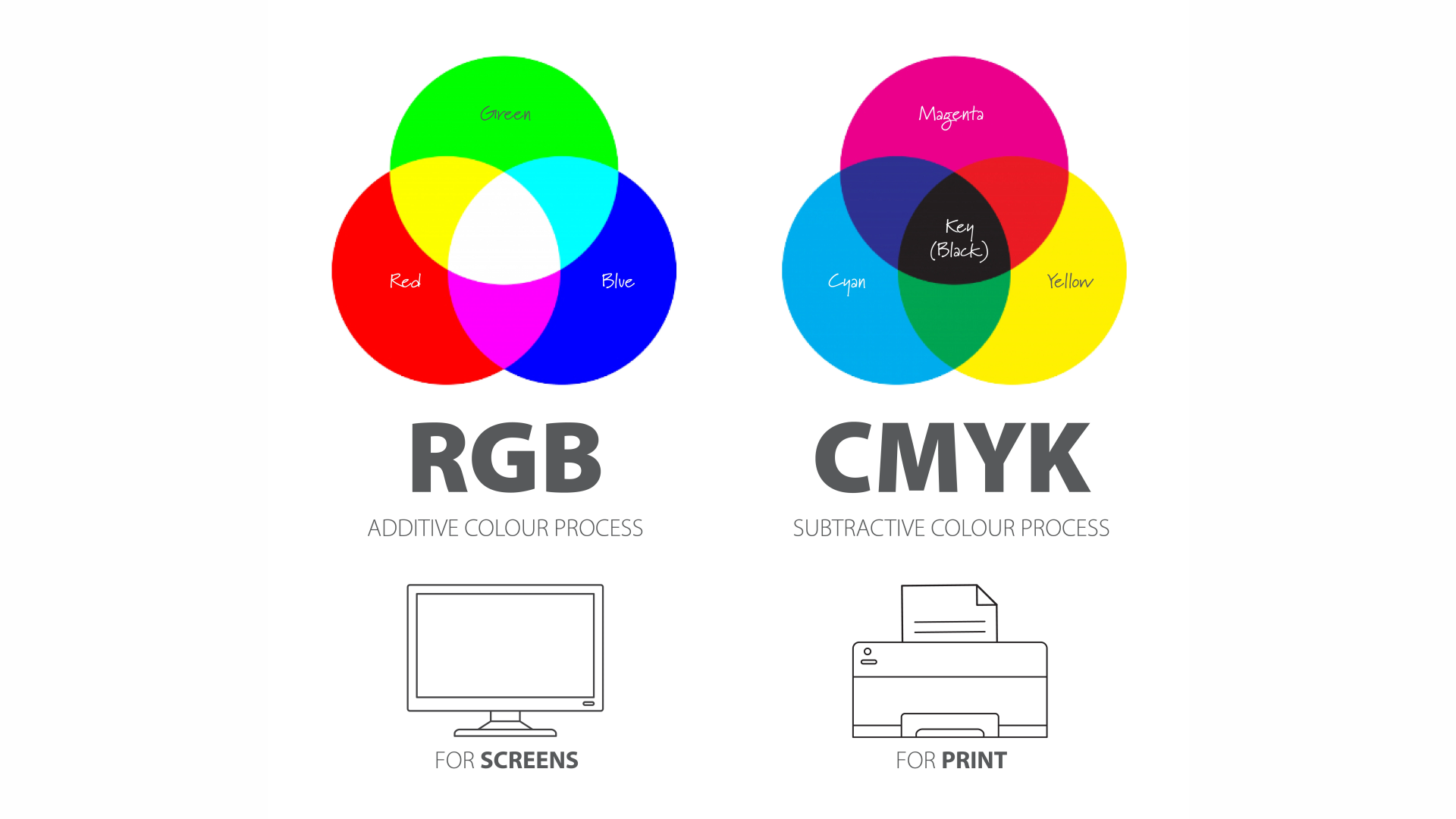
RGB = Red, Green, Blue
RGB एक Light-based Color Model है।
इसका इस्तेमाल मुख्य रूप से:
- Computer Monitor
- Mobile Screen
- TV
- Website
- Social Media
- Digital Graphics
- Photography
में होता है।
आसान उदाहरण:
जो Design आप Mobile या Computer Screen पर देखते हैं, वह सामान्यतः RGB Color Model में दिखाई देता है।
3. CMYK क्या है?
CMYK = Cyan, Magenta, Yellow, Key/Black
यह Printing Color Model है।
इसका इस्तेमाल:
- Visiting Card
- Pamphlet
- Brochure
- Poster
- Book
- Magazine
- Packaging
- Offset Printing
- Digital Printing
- Flex Printing
आदि में किया जाता है।
यहाँ K का मतलब Black है।
4. CMYK vs RGB — मुख्य अंतर
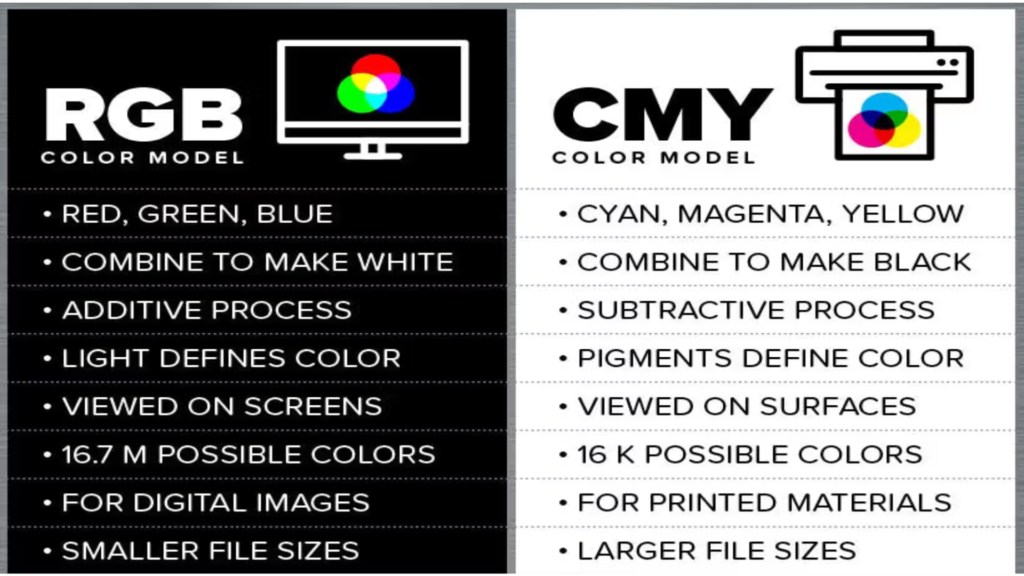
| RGB | CMYK |
| Red, Green, Blue | Cyan, Magenta, Yellow, Black |
| Light-based | Ink-based |
| Screen के लिए | Printing के लिए |
| Mobile/Computer/TV | Printer/Press |
| ज्यादा Bright Colors | Print के लिए Suitable |
| Website & Social Media | Visiting Card & Pamphlet |
| Digital Display | Physical Printing |
5. RGB में Colors ज्यादा Bright क्यों दिखते हैं?
यह बहुत important section है।
समझाएँ:
Screen खुद Light emit करती है, इसलिए RGB colors ज्यादा bright और vibrant दिखाई दे सकते हैं।
लेकिन paper खुद light नहीं देता। Printing में ink/pigment का इस्तेमाल होता है, इसलिए वही color paper पर थोड़ा अलग दिखाई दे सकता है।
6. Printing के लिए CMYK क्यों इस्तेमाल होता है?
जब हम Printing Press या Digital Printer में physical material print करते हैं, तो ink/toner के माध्यम से colors reproduce किए जाते हैं। इसलिए print workflow में CMYK color model बहुत महत्वपूर्ण है।
Examples:
- Visiting Card
- Pamphlet
- Flyer
- Poster
- Brochure
- Book
- Packaging
7. RGB को CMYK में Convert करने पर Color क्यों बदलता है?
RGB Design → CMYK Conversion → Printing
कुछ RGB colors CMYK में exactly reproduce नहीं हो पाते। इसलिए conversion के बाद colors थोड़े dull या अलग दिखाई दे सकते हैं।
यही वजह है कि Printing से पहले Color Mode check करना जरूरी है।
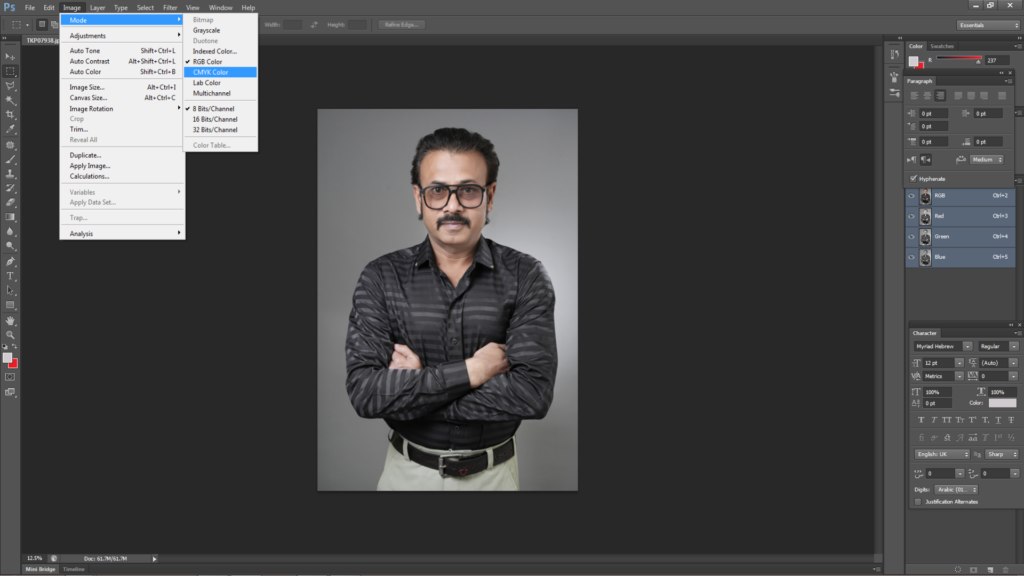
8. Photoshop में RGB से CMYK कैसे करें?
Photoshop → Image → Mode → CMYK Color
फिर image को check करें।
लेकिन एक बात जरूर लिखें:
CMYK में convert करने से पहले original RGB file की एक copy सुरक्षित रखना बेहतर है।
Photoshop for Printing Business
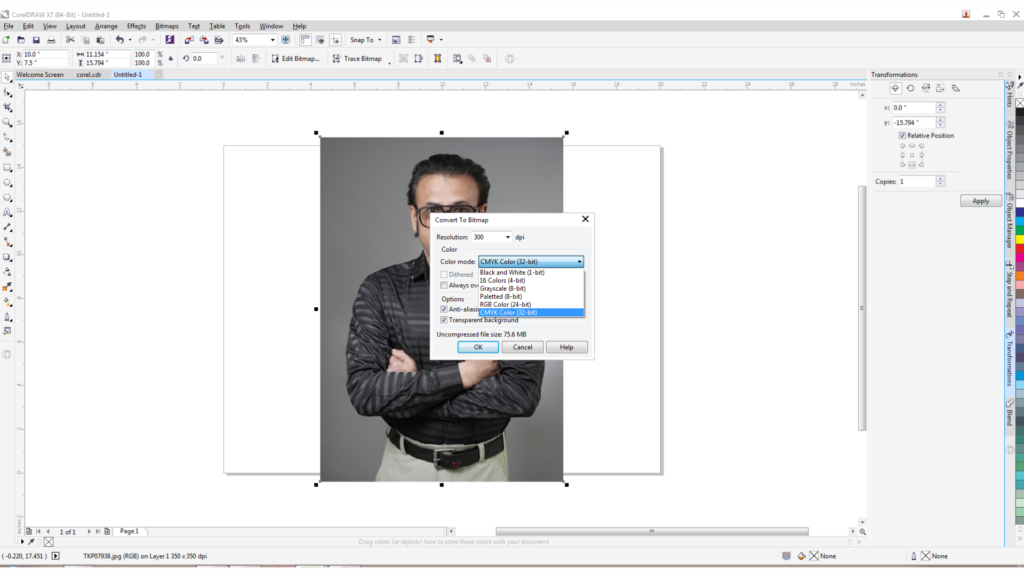
9. CorelDRAW में CMYK कैसे Check करें?
document/page और individual objects के color settings को printing requirement के अनुसार check करना चाहिए।
CorelDRAW for Printing Business
10. RGB कब इस्तेमाल करें?
RGB का उपयोग करें:
- Website
- YouTube Thumbnail
- Instagram Post
- Facebook Creative
- Digital Advertisement
- Mobile/Computer Graphics
11. CMYK कब इस्तेमाल करें?
CMYK का उपयोग करें:
- Visiting Card
- Pamphlet
- Poster
- Brochure
- Letterhead
- Book
- Magazine
- Packaging
- Offset Printing
- अधिकांश Print Production Workflows
12. क्या हर Printing में CMYK ही होता है?
हर printing process केवल standard CMYK तक सीमित नहीं होती। कुछ commercial printing workflows में Pantone/spot colors, additional inks या specialized color systems का उपयोग भी किया जाता है। इसलिए बड़े commercial job में printer/press की specifications पहले confirm करना जरूरी है।
13. Common Mistakes
❌ RGB में Design बनाकर सीधे Printing भेजना
❌ Low Resolution Image इस्तेमाल करना
❌ Screen Color को Print Color के समान मानना
❌ Printer की Color Profile/Specifications ignore करना
❌ Original File का Backup न रखना
14. CMYK vs RGB
| काम | Color Mode |
| Website | RGB |
| RGB | |
| YouTube Thumbnail | RGB |
| Mobile/Screen | RGB |
| Visiting Card | CMYK |
| Pamphlet | CMYK |
| Brochure | CMYK |
| Poster | CMYK |
| Book | CMYK |
| Packaging | CMYK |
15. FAQ
Q. CMYK क्या है?
Ans. C – Cyan, M – Magenta, Y – Yellow, K – Black
Q. RGB क्या है?
Ans. R – Red, G – Green, B – Blue
Q. CMYK और RGB में क्या अंतर है?
Ans. RGB Colour Light Based होते है और CMYK Colour Ink-based होते है।
Q. Printing के लिए CMYK क्यों इस्तेमाल किया जाता है?
Ans. जब हम Printing Press या Digital Printer में physical material print करते हैं, तो ink/toner के माध्यम से colors reproduce किए जाते हैं। इसलिए print workflow में CMYK color model बहुत महत्वपूर्ण है।
Q. क्या RGB में बना Design Print कर सकते हैं?
Ans. No.
Q. RGB को CMYK में कैसे Convert करें?
Ans. In corelDraw convert bitmap RGB to CMYK & Photoshop change colour mode RGB to CMYK.
Q. Photoshop में Printing के लिए CMYK कैसे सेट करें?
Ans. Change colour mode.
Q. Website और Social Media के लिए RGB क्यों इस्तेमाल होता है?
Ans. RGB Colour जायदा Bright होते है इसलिए
🚀 Printing Business सीखना चाहते हैं?
यदि आप Printing Business शुरू करना चाहते हैं या अपने मौजूदा Printing Business को Grow करना चाहते हैं, तो मेरा FREE Live Webinar Join करें।
मैं ठाकुर सुनील चौहान हूँ। मुझे Printing Industry में 35 वर्षों का Practical Experience है और मुझे PrintWeek Magazine में भी Feature किया जा चुका है।
Webinar में मैं अपने Practical Experience के आधार पर Printing Business, Customer Acquisition, Marketing और Business Growth की महत्वपूर्ण Strategies शेयर करता हूँ।
👉 आज ही अपना FREE Webinar Seat Book करें और अपने Printing Business की Growth की शुरुआत करें।